
HOW TO PLAY · TIPS · FREQUENTLY ASKED QUESTIONS
Play Prism Pop for free
One small swap, a glowing line of matching colours and suddenly a whole wave of success: Prism Pop combines easy-to-understand gameplay with colourful tiles in a 3D style, vibrant pop animations and varied challenges. Swap neighbouring tiles, bring at least three tiles of the same colour together and work your way through 300 levels. When several lines disappear one after another, chain reactions rearrange the board and send your score climbing.
You can play Prism Pop for free and without signing up for the game. There is no player account to create first and no separate game app to install. The controls work with a mouse, a touchscreen and selected keyboard commands. Whether you want a quick round between other activities or intend to complete an entire chapter, getting started stays simple while later levels demand a broader view of the board and more thoughtful decisions.
Here you will learn how to make the right matches, which power tiles can help you and what matters when tackling different level objectives. This guide takes you from your first swap to tactical combinations with lightning tiles and colour bombs. Read each section in turn or jump straight to the playing tips and frequently asked questions.
How Prism Pop works: swap, match and progress
Prism Pop is a match-3 game. Here, a match means bringing compatible tiles together. The most important rule is that at least three tiles of the same colour must sit directly next to one another in a horizontal or vertical line. You achieve this by swapping two neighbouring tiles. A single swap can create a simple line of three, complete several lines at once or activate an existing power tile.
Matching tiles disappear in a striking animation. The tiles above drop into the empty spaces, and new tiles refill the board. If this creates more matching lines, those disappear too. One decision can therefore become a longer cascade. You do not need to click anything else while this sequence runs: the game processes the resulting matches automatically.
Tiles arranged diagonally do not form a valid line. You also cannot move a tile freely across the whole board. Swaps are always limited to immediate neighbours. An ordinary swap that creates no matching line is reversed; existing power tiles give you additional options. These clear rules make the game easy to understand while leaving plenty of room to discover better moves.
Your first level: an easy introduction with a big wave of success
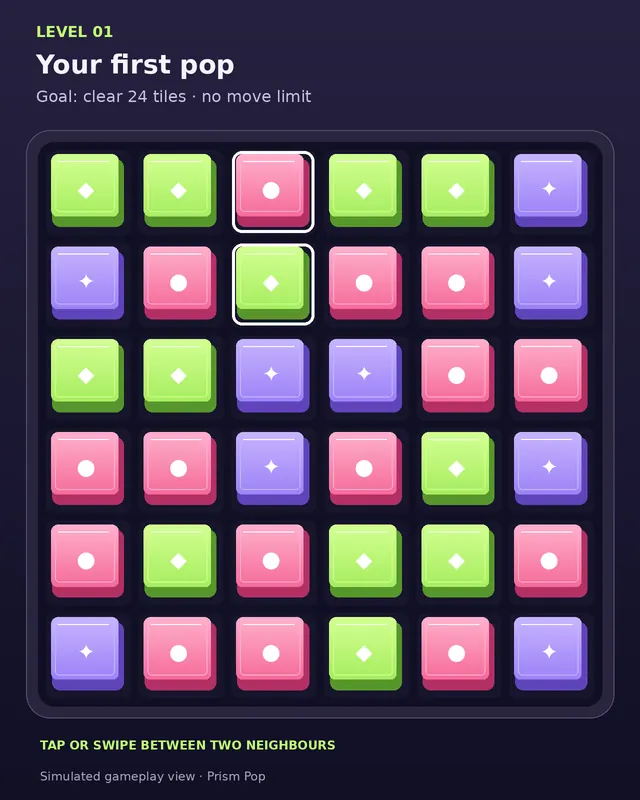
The first level is designed as a practice round. The board starts with six by six spaces and only three colours. The larger tiles make it easier to recognise how matches work. Two glowing tiles indicate a suitable first swap. When you exchange these neighbours, several lines match at once, followed by further prepared chain reactions. You immediately get to see how falling tiles and new matches work together.
This first wave of success explains more than a long set of rules could: you see where a line disappears, how new tiles arrive and why a single move can produce several results. The objective in the first level is to pop 24 tiles. There is no move limit putting you under pressure. You can focus on the controls and watch how the colours follow one another.
The next few early levels also give you time to learn. Power tiles are introduced gradually, and the initial objectives remain manageable. You therefore do not have to know every special combination in your very first round. Use this introduction to read the board carefully. That understanding will help later, when extra colours, larger boards and limited moves enter the game.
Play on your phone or desktop
Prism Pop is designed for different screen sizes. On your phone, tap a tile and then select its neighbour. Alternatively, swipe from the tile you want to move towards the neighbouring space. Both methods perform the same swap. Keep your movement clearly horizontal or vertical so that your intended direction is unambiguous. While a combination is playing out, wait briefly until the board is ready again.
On a desktop computer, select the tiles with your mouse. Use the arrow keys to move between spaces; Enter selects the tile that has keyboard focus. This lets you play without constantly switching between mouse and keyboard. The visible symbols on the tiles complement their colours and help you find your way around. Special tiles have additional markings to show what each one does.
The fullscreen function enlarges the playing area where your browser supports it. If true fullscreen is unavailable, the game uses a focused view with less surrounding content. This is particularly useful when you want to concentrate on a more challenging level. The switch at the top also lets you leave this view. The appearance always depends on your device, window size and browser.
Which controls suit you best?
- Phone and tablet: Tap two neighbouring tiles or swipe between them.
- Computer: Select both tiles with your mouse.
- Keyboard: Use the arrow keys to navigate and Enter to select.
- More room: Use the top switch to enable fullscreen or the focused game view.
Play online in your browser without signing up
To play Prism Pop in your browser, you do not need to download a separate game app. The game loads as a webpage and processes your swaps directly in the browser. You need a browser with JavaScript enabled for the board, animations and controls to work. An internet connection is required to load the game page. The gameplay itself does not require a personal user profile.
Without signing up means that Prism Pop itself requires neither a registered player account nor personal login details. Your progress is saved locally in the browser you use. When the game is later added to a gaming portal, that portal may have its own access rules; those are separate from the game. Within Prism Pop, you can start and unlock levels without creating an additional account.
This type of browser game makes getting started straightforward. Open the page, check the level objective and make your first swap. Trying again is just as simple. The important thing is to use the same browser if you want to continue the progress saved there. Another device will not automatically pick up your local game progress.
300 levels with changing objectives and a growing challenge
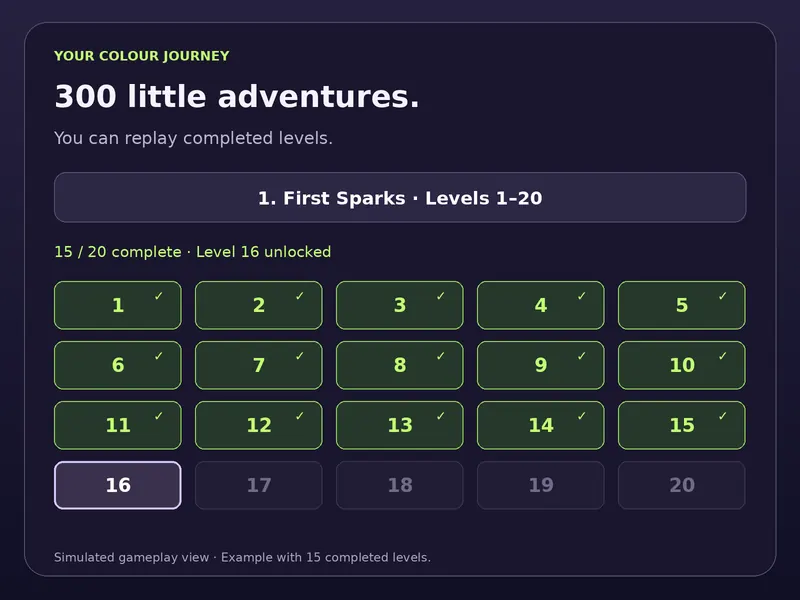
Prism Pop contains 300 levels, divided into 15 chapters of 20 levels each. Every chapter has its own name and visual atmosphere. Examples include First Sparks, Northern Lights, Neon Rain, Stardust and the Prism Finale. Your journey is therefore more than a sequence of numbers: different colour worlds and musical themes give each chapter a recognisable character.
The board grows as you progress. In the first ten levels, you play on a six-by-six board. Levels eleven to twenty use seven by seven spaces; after that, the game uses eight by eight. More colours join the initial three. A larger board offers more possible matches, but also asks you to keep track of several areas at once.
The difficulty does not rise at exactly the same pace in every round. The game alternates between easier waves of success and challenges that call for more tactical play. A more accessible level may therefore follow a demanding round. Even so, the overall requirements increase: you need more matching hits, must pursue particular objectives deliberately and later have to work with a limited supply of successful moves.
Understand these four types of objective
- Clear tiles: Every tile removed brings you closer to the required total.
- Score points: Reach a target score, with longer chain reactions proving particularly helpful.
- Collect a colour: Only cleared tiles of the indicated colour count towards the objective.
- Clear ice spaces: You need to land hits on the frozen positions on the board.
The display above the board names your current objective and shows your progress. Give it a quick read each time you change levels. A move that makes sense in a score-based level may do little for a colour-collection challenge. Playing successfully therefore means more than making any available line: check how that line contributes to the specific task.
Chain reactions: why one move can trigger several lines
A chain reaction occurs when new matching lines appear on the board after the first pop. Falling tiles make this happen: a colour that was previously in the wrong place may drop into a matching position. New tiles arrive at the same time. If this brings three or more tiles of the same colour together, the next wave starts. Some moves finish after one line, while others trigger several consecutive waves.
A longer cascade is valuable when scoring points. Within a single move, the cleared tiles receive a higher multiplier with each additional wave. The best-combo display records how far your strongest chain reaction went in the current level. However, a high score and a big combo do not always mean the objective is complete: colour and ice challenges depend on the right kind of hits.
Matches created by falling tiles are briefly highlighted before the next pop. This lets you follow which newly formed line triggers the next wave. The preview makes the sequence easier to read and helps you understand patterns. Pay particular attention to the spaces below a line you plan to make. Sometimes you can see which colours might fall down before you even make the swap.
Use lightning tiles and colour bombs effectively
Power tiles expand your options. A match of four tiles of the same colour creates a lightning tile once that mechanic has been introduced. Depending on its orientation, lightning can hit an entire row or column. Its marking shows the direction it affects. Activate it by swapping it with a neighbouring tile. It is therefore worth deliberately looking for matches of four rather than only lines of three.
Colour bombs join the game from level eleven. Five matching tiles in a valid line can create this special tile. When you swap a colour bomb with an ordinary neighbour, its effect targets that neighbour’s colour. This lets you hit matching tiles in different parts of the board. In a colour-collection challenge, this choice can be especially valuable if you use the required colour as the swap partner.
Power tiles are also useful when the board offers few appealing ordinary matches. You can trigger their effects deliberately and open up difficult areas. Still, consider which objective you want to achieve first. Lightning in the wrong row may remove many tiles while missing an important ice space. A suitable position is often worth more than using a power tile as early as possible.
When two power tiles meet
- Lightning plus lightning: The combination creates cross lightning that hits a row and a column.
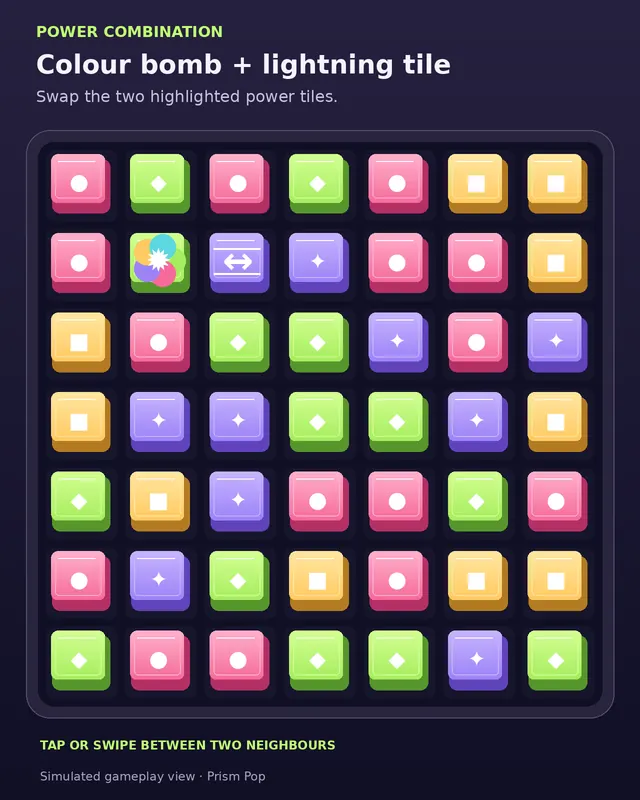
- Colour bomb plus lightning: Tiles matching the lightning tile’s colour become lightning tiles and trigger a larger lightning storm.
- Colour bomb plus colour bomb: The combination clears the whole board and can create a particularly powerful new situation.
To make these combinations, swap two neighbouring power tiles directly with each other. Simply having them somewhere on the board is not enough. Occasionally, plan one move ahead: could falling tiles bring one power tile closer to the other? This preparation is not necessary in every round, but it helps you use stronger effects at the right moment.
Clear ice spaces: position becomes the key objective
From level 31, selected rounds contain frozen spaces. You can recognise them by their pale outline and snowflake symbol. To clear one, the tile in that position must be hit by a match or a power effect. The task concerns the space itself. Pay attention to where your effect lands, rather than only which colour you remove.
Lightning can reach several frozen positions in a row or column. A colour bomb helps when the relevant colours are spread across ice spaces. Sometimes, however, a simple line of three is the best solution because it hits the last difficult position precisely. Before using a larger effect, consider which spaces might remain afterwards. This helps you avoid spending too many moves on easily reached areas.
A useful approach is to tackle hard-to-reach ice spaces early. Edge positions may offer fewer direct swap opportunities than the centre. If a matching line becomes available there, it is often a good chance to act. The objective display helps you keep track: once all required ice spaces are cleared, the task is complete, no matter how many other tiles remain on the board.
What the displays and controls mean
Above the board, you will find the level number, level name and current objective. The progress bar shows how far you have come. Below the board are your score, moves and best combo. In a round without a move limit, the display counts the moves you have used. In limited levels, it shows the moves you have left instead. This distinction matters when deciding what to do next.
“Show hint” highlights a possible swap. It helps when you overlook a matching line or face an unfamiliar board. “Restart level” starts the current round again. The level map shows unlocked challenges and lets you select levels you have already reached. Locked levels become available gradually as you successfully complete earlier ones.
The top controls offer sound, fullscreen and game help. The help summarises the main rules and explains the current mechanic. If no possible swaps remain, the game supplies fresh colours. You do not have to reset the board yourself in that situation. This keeps the controls focused on your real objective: finding suitable matches and completing the task at hand.
Pop animations, sound and a clear end to each level
Part of Prism Pop’s appeal is that successful moves receive both a visual and an audible response. The tiles have a three-dimensional appearance, disappear in particles and can trigger stronger effects such as lightning or larger colour explosions. The sound cues rise as combinations get longer. Different chapters use their own themes, giving the journey a changing character through sound as well.
After a successful round, “Level complete” appears directly on the board. “Keep playing” is clearly visible there too. After ordinary level completions, the game automatically continues following a short success display; “Pause” lets you stop this transition. Chapter completions are also highlighted in the game area. Your attention stays on the board, and you do not have to look far below the game to find your next step.
If you prefer to play without audio, you can turn sound off. Essential information remains visible: the objective display, progress, special-tile markings and completion message explain the current state of the round. On devices with reduced motion enabled, various animations are shortened or omitted. You can therefore enjoy Prism Pop with less movement on screen as well.
Playing tips: make your moves count
1. Read the objective before studying the board
Before swapping to make an eye-catching line, check the task. Do you need points, a particular colour or hits on ice spaces? A big effect is especially helpful when it also provides the required progress. Get into the habit of glancing at the objective display. This small routine stops you spending several moves in a limited round on matches that contribute very little to the solution.
2. Look for four or five matching colours
A line of three is a good start. A line of four or five can also prepare a power tile. Check whether a different neighbouring swap would make better use of the same starting position. Not every round offers this opportunity, and there is no need to force it. When it arises without a lengthy detour, however, it often gives you more options later.
3. Think about the falling tiles
A swap changes more than the line you clear directly. Tiles above fall down and may form new connections. Matches lower on the board often affect several positions above them. This is an interesting opportunity, but not a guarantee of a cascade. Compare several moves and look for matching colours already waiting above the gap you plan to create.
4. Choose power tiles to fit the problem
If you need to reach an ice space at the edge, properly aligned lightning often helps more than a random large combination in the middle. In a colour challenge, a colour bomb with the right neighbour may be decisive. Check the area of effect before swapping. A smaller, targeted effect is sometimes a better choice than a spectacular action with no clear connection to your objective.
5. Use hints and retries thoughtfully
A hint can show you an opportunity you have missed. It does not replace deciding whether that move suits your objective. After two failed attempts at a limited level, the game offers a help option with three additional moves and swap hints. Use it or try again under the normal conditions. On your next attempt, consider where you ran short of moves before.
6. Stay focused and take breaks when you need them
Especially with several colours in play, a quiet moment can reveal a better move. You do not have to solve a round by tapping as quickly as possible. Wait for animations to finish, then look at the rearranged board. If you need a break, use the available pause or end your session after completing a level. Saved progress makes returning later straightforward.
Save your progress and replay favourite levels
Prism Pop saves unlocked and completed levels in your browser’s local storage. This lets you continue your colour journey there later. No player account is needed for saving. The stored progress is tied to the browser and the origin of the game page. If you clear browsing data, use a private browsing mode or open the game on another device, your previous progress may not be available there.
Completed challenges are marked on the level map. Replay them to experiment with combinations, practise a particular mechanic or simply enjoy a familiar round. Replaying does not replace completing still-locked challenges: new levels continue to unlock through successful completions. The current version of the game does not automatically synchronise progress between your phone and computer.
Play for free and support further development voluntarily
You can play Prism Pop for free. Donations are optional and are not required to reach the next level. Under “Bring colour into play.” you will find the link “Support alexo.org now to help keep the game free.” It leads to Ko-fi and opens in a new tab. Whether to support development is entirely your choice.
An additional support message appears on the board after every 15 levels you successfully complete for the first time. Stars and hearts surround the donation button for around three seconds. “Keep playing” sits underneath. You can continue directly without opening the donation link. Replaying previously completed levels does not increase this counter. The display therefore celebrates your progress while leaving the decision to support the game with you.
FAQ: frequently asked questions about Prism Pop
Is Prism Pop really free?
Yes. The current version offers all 300 levels without any purchase requirement. The Ko-fi donation link is optional. You do not need to open it to keep playing. After a support message appears, simply press “Keep playing” to start your next round.
Can I play Prism Pop without signing up?
Prism Pop itself does not need a player account. You can start without signing up for the game, and your progress is saved locally. If a gaming portal has its own access rules, those additionally apply to its page. The game does not require separate registration.
Do I have to install an app?
No. Prism Pop runs as a browser game. Open the game page in a browser with JavaScript enabled. A separate game app or extra extension is not required for the intended features. You need an internet connection to load the page.
How many levels are there?
The game contains 300 levels in 15 chapters, each with 20 challenges. Unlock new levels by completing earlier ones successfully. Objectives, board sizes and requirements vary along the way. Levels you have already reached remain available through the level map.
How do I move the tiles?
Swap two immediate neighbours. Tap or click one tile first, then the neighbouring tile. On a touchscreen, you can also swipe in the direction you want to swap. Moving a tile freely to any position is not part of the game.
Do diagonal colour lines count?
No. Ordinary matches consist of at least three directly connected tiles of the same colour, arranged horizontally or vertically. Diagonal arrangements do not disappear as matching lines. Plan around rows and columns instead.
What happens if a swap makes no match?
An ordinary swap without a matching line is reversed. You can then choose another option. Using an existing power tile is an additional valid action. Successful swaps count as moves; ordinary unsuccessful swaps that are reversed do not use up a successful move.
How are lightning tiles and colour bombs created?
Four matching tiles in a valid line can create a lightning tile. From level eleven, lines of five can also reward you with colour bombs. Activate the special tile by swapping it with a neighbour. Its effect depends on the power tile concerned or the tile you swap it with.
What does a chain reaction do?
After a pop, tiles drop down and new ones arrive. If that creates further matching lines, those disappear too. The sequence runs automatically. With each additional wave within the same move, the multiplier for cleared tiles increases.
What can I do if a level is too difficult?
Use “Show hint”, check your objective and try targeted power combinations. After two failed attempts at a limited level, you can choose help with three extra moves and swap hints. Alternatively, restart the level without this assistance.
Can I use the same progress on my phone and computer?
Progress is stored in each browser and is not automatically synchronised between devices. On the same device and in the same browser, you can usually continue as long as the saved data remains intact. Clearing browsing data can remove your game progress.
Are there fullscreen and sound controls?
Yes. The controls at the top offer a sound switch and fullscreen. If the browser does not support true fullscreen, the game can use a focused view. Objective displays, power-tile markings and level completions remain visible even without sound.
When does the donation button appear on the board?
The support message appears after every 15 levels completed for the first time. Replaying completed levels does not count again. You can voluntarily open Ko-fi or select “Keep playing” straight away. The stars-and-hearts animation runs for around three seconds when the message appears.
Can I pause a round?
After ordinary successful completions, “Pause” stops the automatic level transition. Opening help or switching away from the visible tab also pauses an automatic transition that is still pending. Use the continue button to start the next level.
Your next good move starts with a look at the objective. Find a matching colour line, watch the falling tiles and use power tiles where they help you most. If you want to play Prism Pop for free in your browser, your next wave of success is waiting on the board directly above this guide.
More free games on Alexo
Ready for another challenge? Enjoy quick rallies in PONG, fly through the galaxy in STARTRAIL, or fit colourful shapes in PRISM BLOCKS. All three are free to play directly in your browser.