
How to play · Features · Tips
Play Startrail online for free
Startrail drops you into a colourful galaxy of asteroids, large planets and moving alien ships. Steer your spaceship, collect golden stars, build scoring combos and pick up useful power-ups. Your objective is to survive until the mission ends and unlock the next level. There are 100 missions across ten sectors.
On Alexo you can play free online, without signing up or downloading an app. You do not need an account or an email address to start. Choose a relaxed flight or a tougher challenge: three difficulty settings, unlockable ship designs and your personal best give you different goals. Sound cues, particles and visible collisions provide feedback as you fly.
The game at a glance
Startrail is a skill-based arcade game with a portrait play area. Obstacles travel down the screen while you move freely left, right, up and down. There is no lengthy tutorial or complicated menu to learn. A quick introduction to the controls is enough to begin; each flight helps you judge distances, safe routes and reachable stars.
- 100 levels: ten space sectors containing ten missions each.
- Three difficulties: Relaxed, Adventure and Expert.
- Flexible controls: finger or mouse dragging, WASD or arrow keys.
- Stars and scores: collectibles, combos and completion bonuses.
- Power-ups: energy shield, star magnet and double points.
- Four ship designs: one starter ship and three unlockable alternatives.
- Clear feedback: sounds, shockwaves, debris and victory fanfares.
Play one mission during a short break or several in a row. Explore the galaxy, save stars for your hangar or aim for a particularly clean flight: you choose your own focus.
Play on mobile or desktop
Steer with your thumb
On your phone, touch the play area and drag. Your ship follows the movement relative to its current position; it does not jump underneath your thumb when you first touch the screen. This lets you choose a comfortable grip without hiding your ship. Small movements are often enough to dodge an asteroid or collect a row of stars.
The portrait layout is mobile-friendly. Begin with gentle movements and get a feel for the response. Correct an overshoot with a small movement back. You can lift and reposition your finger: what matters is the movement after touching, not the initial contact point.
Keyboard and mouse controls
On desktop, use WASD or the arrow keys. W or Up moves upwards, S downwards, A left and D right. Hold two directions together to fly diagonally, for example to dodge while lining up with the next stars.
The play area receives keyboard focus when a mission starts. If the controls stop responding after another action, click inside it again. Press P to pause. You can also drag with your mouse and choose the control method you prefer.
Free browser game with no registration
Open the page, select your difficulty and launch. Startrail is completely free to play in your browser, with no app installation, account or registration required. All 100 levels and all difficulty settings are available through normal play.
Progress is stored locally in your current browser: unlocked levels, stars, purchased ship designs, your selections and personal best. It does not automatically transfer to another device or browser. Deleting the site's local data may also delete your progress.
Use an up-to-date browser for smoother play; closing demanding applications may help on older devices. The game loads from an online page; no standalone offline edition is provided. After loading, gameplay runs in your browser. The optional Ko-fi support link opens a separate external page.
How a mission works
Launch, watch and survive
The start screen shows your selected level and difficulty choices. Choose “Start mission”. Your ship begins near the bottom; the top display shows the level, score and remaining shield energy. The progress bar tracks the time elapsed in your mission.
- Select an unlocked level and a suitable difficulty.
- Start the mission and watch the space above your ship.
- Dodge hazards and collect stars you can safely reach.
- Pick up power-ups when the route is clear.
- Survive until the mission timer ends to unlock the next level.
There is no minimum score and you do not need every star. Survival completes the level; points are an extra challenge. A careful flight with fewer stars can be more successful than a risky attempt to collect everything.
Every attempt starts with the full shield energy for your difficulty. You do not buy lives or wait to retry. Obstacles are generated again, so read the current situation even on a familiar mission. Your ship choice stays selected. To change difficulty between attempts, return to mission selection and choose it on the start screen.
Results and retries
After a successful flight, the result shows your points, collected stars and best combo, accompanied by a fanfare and golden particles. Continue to the next level or return to selection. Previously unlocked missions remain replayable.
If you run out of shield energy, a collision animation plays before the result. You keep the stars collected even when you lose, so you can still work towards another ship. The next level only unlocks after a successful flight.
100 levels in ten sectors
The galaxy consists of Neon Nebula, Crystal Orbit, Emerald Belt, Solar Storm, Violet Expanse, Ice Galaxy, Ruby Sector, Alien Territory, Golden Nova and The Stargate. Each contains ten levels and has its own colour palette. The galaxy menu marks completed, available and locked missions.
These are rule-generated missions, not one hundred fixed, hand-drawn routes. Obstacle and collectible positions can change when you retry. Learn to recognise situations and respond instead of memorising a single path.
Flight time and increasing speed
Flights last approximately 29–53 seconds, depending on the level. This gives you time to collect several star groups, use power-ups and regain your rhythm after a hit. Later missions demand longer concentration; the progress bar helps you judge how far remains.
From level 15, an extra speed factor increases by 0.5 percentage points per level, capped at 35% extra speed. Earlier levels already have their own base progression, and obstacle frequency also changes through the campaign. Every tenth level places more emphasis on alien encounters.
Recognise the hazards
Asteroids
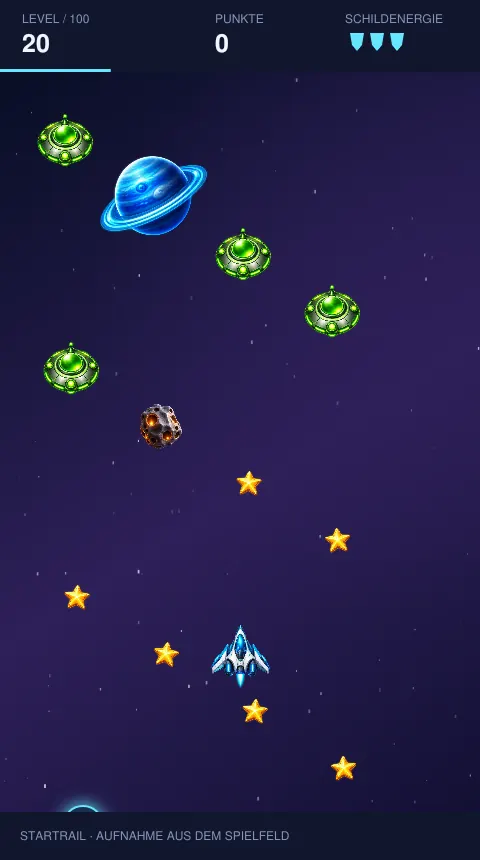
Asteroids appear from the beginning, vary in size, rotate and may drift sideways. Watch where they are heading as well as where they are now. A small early correction is usually safer than a last-second dodge.
Planets
Planets can appear from level 4. They take up more space and move more slowly than some other objects. Allow a wider route around them and watch nearby asteroids. Their visible rings are part of the artwork; leave a comfortable margin around the whole object rather than trying to skim it.
Alien ships
Aliens appear from level 7 and move from side to side. A clear route can therefore narrow quickly. From level 10 they can also fire towards you. Plan ahead, stay mobile and avoid unnecessary changes of direction that could take you into another hazard.
Choose your difficulty
Difficulty affects speed, obstacle frequency and shield energy. Choose it before the mission. All three settings are free, and unlocked levels are shared between them rather than split into separate campaigns.
- Relaxed: five shield energy units and reduced speed; useful for learning the controls.
- Adventure: three energy units and normal speed, balancing collecting and dodging.
- Expert: two energy units, greater speed and more frequent obstacles; precise decisions matter.
Try a new hazard on Relaxed, then return to Adventure or Expert when you know its movement. You do not have to use the same difficulty every time: a clean, easier flight can be as satisfying as narrowly surviving a harder one.
Stars, points and combos
Every golden star adds one to your star balance and initially scores 50 points. Points measure the current flight; stars are the currency used for ship designs. Your personal best records your highest saved single-mission score. There is no public online leaderboard.
Build a combo
Collect stars without taking damage. Every five stars raises the multiplier by one step, up to ×5. Missing a star does not break the streak; taking an unprotected hit does. At ×3, a star is worth 150 rather than 50 points. An active double-points power-up doubles that again.
Collect with control. A group is valuable when you can reach it without brushing hazards, but do not risk everything to preserve a streak. A safe escape matters more than one extra star, and surviving remains the basis of the completion bonus.
Completion bonus
Winning adds a bonus based on the level and remaining shield energy. Arriving with more energy rewards careful flying. Scores belong to individual missions; they do not automatically add up to a single campaign-wide score.
Shield, magnet and double points
Power-ups appear randomly and activate when collected, without another menu. On-screen timers show how long they last. Several effects can run together, such as a magnet and double points. They are temporary effects, not permanent upgrades you purchase.
Energy shield: eight seconds
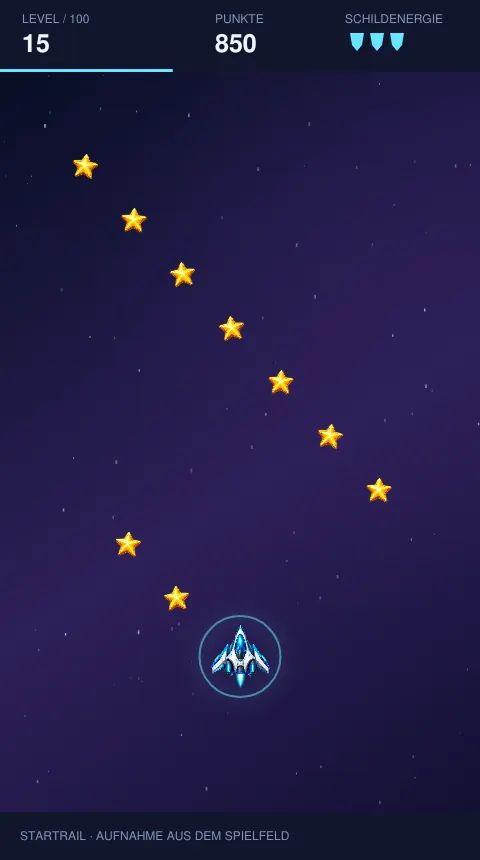
The shield prevents collision damage for eight seconds. A turquoise ring indicates protection; a collision produces a matching impact effect without costing shield energy. This differs from the small shield icons at the top, which represent your remaining hits.
Star magnet: ten seconds
The magnet attracts nearby stars for ten seconds. Keep a safe line while reaching rewards that would otherwise require precise steering. It does not collect every star across the whole screen, and it does not replace planning ahead.
Double points: ten seconds
The ×2 bonus doubles star points for ten seconds, including your combo. With the maximum combo, one star can score 500 points. It does not double your hangar currency; it improves the flight score and helps with personal record attempts.
Unlock ships in the hangar
Stars carry over between flights. Aurora is your free starter ship; Pink Pulse costs 100 stars, Solaris 250 and Nebula 500. Once unlocked, a design can be selected and you can switch between owned ships whenever you return to the hangar.
All four have the same flying abilities. Their appearance changes, not speed, manoeuvrability or shield energy. Choose the style you like; even the hardest missions can be tackled in Aurora. Unlocks are visual rewards, not hidden performance advantages.
Sounds and collision effects
Different sounds mark collecting stars, picking up power-ups, increasing combos, launching, taking hits and losing. Successful missions have a fanfare. These cues help you follow events without reading every display.
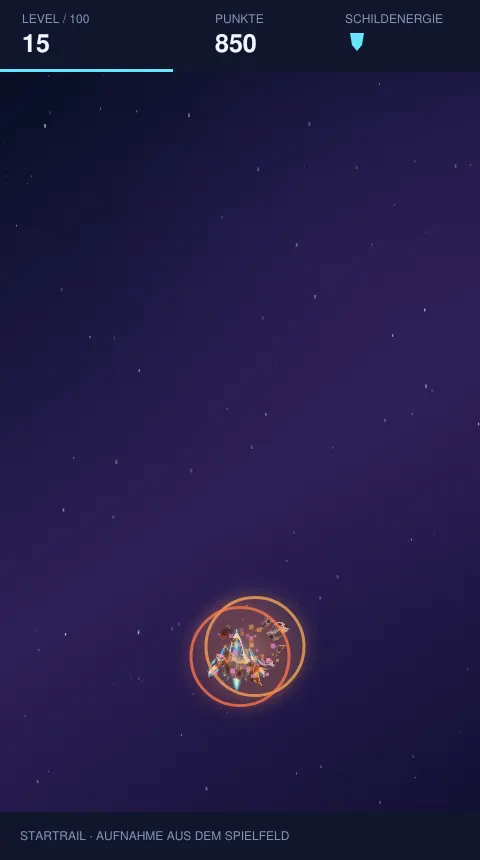
Collisions create debris, a shockwave and a bright flash. Without protection, you lose one energy unit and briefly become immune to further damage. The final hit includes an explosion before the result appears. Victories bring golden particles. The sound button lets you mute at any time while visual feedback remains available.
Pause, fullscreen and saved progress
Pause with the button or P when you need a break or want to reposition your hand. Switching tabs or losing window focus also pauses the game. Use “Resume flight” to continue from the same point.
The fullscreen button uses native fullscreen when your browser supports it. Otherwise it maximises the play area. Availability depends on the device, browser and any embedding permissions.
Progress is saved after finished flights, including stars from failed attempts. An ongoing mission is not saved as a resumable checkpoint. Reloading or closing the page means starting the next flight from the beginning. Use pause for a brief interruption.
Read the displays
The top left shows the mission number; the centre shows this flight’s points; the shields on the right show remaining hits. The thin progress bar follows elapsed mission time, independently of score. A low-scoring flight can still be nearly complete.
The combo display shows a damage-free collecting streak; a brief message marks a new multiplier step. Power-up timers show when protection or double points will end. Glance at these quickly instead of studying numbers during a narrow passage.
Larger screens show extra flight-profile and bonus panels. Mobile focuses on the game itself, with galaxy and hangar buttons still accessible. Open them between missions or after pausing, so you do not lose track of your flight.
Set your own goals
Besides unlocking the next mission, try completing a familiar level with full energy, building a better combo or saving the stars still needed for Pink Pulse. You can give an old level a fresh purpose without unlocking another mode.
A record attempt combines safe routes, star groups and temporary bonuses. A magnet can bring in stars while ×2 increases their value, but these items appear randomly. You cannot order them or guarantee the same combination on the next attempt; adapt to what actually appears.
Your saved record spans difficulties. It is neither a separate leaderboard for each setting nor a comparison with other players. For a meaningful personal comparison, replay similar missions at the same difficulty and observe your control, hits and use of bonuses.
Your first five missions
Start by learning reliable control on Relaxed, with five energy units and more time to read hazards. Stay in the lower or middle part of the field so you can see objects approaching. After dodging, return to a position with a clear view.
Next, collect stars already along your safe route, then try taking a whole group in one gentle movement. Watch how your combo grows and what a hit does to it. Once planets appear, consciously leave more space. These small exercises help more than aggressive flying from the start.
After five wins, choose whether to continue, replay a level, visit the hangar or take a break. The support button after level 5 is optional, not a task or payment barrier.
Tips for safer flights and higher scores
Look ahead and leave an exit
Watch above your ship. Find both the next gap and a possible escape route afterwards. The edge gives you less room; the middle often allows movement to either side when the situation permits.
Prefer reachable stars
Do not cross the whole field for one star with hazards in between. Small course corrections are easier to manage. A long, damage-free streak usually beats an extra star just before a collision.
Use power-ups with a plan
With the magnet, focus on safe gaps. With double points, clear star rows become attractive. A shield gives you freedom for only eight seconds: watch its timer and resume careful dodging before it expires. The ring is no reason to force every tight passage.
Practise before raising difficulty
If you repeatedly lose early, try the same mission on Relaxed and study the planet or alien movements that cause trouble. Return to your preferred setting afterwards. Familiar levels are also good for refining touch or keyboard movements while collecting hangar stars.
Startrail FAQ
Is Startrail really free?
Yes. All 100 levels and all three difficulties are free. Ship designs unlock with stars earned by playing. Ko-fi support is voluntary and never required for another flight.
Can I play without signing up?
Yes. No registration or account is required. Progress is saved locally in your browser. On Alexo you start directly on the game page without creating an account.
How do I steer on mobile?
Touch the play area and drag. Your ship follows the relative movement without jumping under your thumb. Lift and reposition your finger whenever needed, then continue dragging.
Which keys work on desktop?
Use WASD or the arrows; combine directions to fly diagonally. P pauses the mission. If the keys stop responding after another action, click back inside the play area.
How do I unlock the next level?
Survive until the mission time ends. No minimum score is needed. Winning unlocks the next mission, and the galaxy menu shows available and completed levels.
Are all 100 levels fixed routes?
No. The campaign has 100 stages with different conditions. Obstacles and collectibles are rule-generated and can change positions on a retry; these are not 100 unchanging hand-drawn routes.
Do I lose my stars if I fail?
No. Collected stars are credited even after a lost flight. That does not unlock the next level, but you can spend the stars on ship designs and retry.
What is the difference between shield energy and the shield power-up?
The small shield icons show how many hits you can still take. The collectible shield prevents collision damage for eight seconds, shown by a turquoise ring around your ship.
How do I increase my combo?
Collect stars without taking damage. Every five stars raises the multiplier, up to ×5. Missing a star does not reset the streak; an unprotected hit does.
Does double points also double my hangar stars?
No. It doubles collected-star points for ten seconds. Your ship currency still increases by one per collected star. The power-up can combine with a combo.
Are unlocked ships faster or stronger?
No. Aurora, Pink Pulse, Solaris and Nebula differ only visually. All fly the same. The three extra designs cost 100, 250 and 500 stars.
Can I continue on another device?
Saves stay in the browser on your current device. There is no automatic transfer to another device or browser. Clearing local website data can remove your progress.
Can I play without sound?
Yes. Toggle sound off or on using the sound button. Visual indicators, particles and collision animations remain. If there is no sound after loading, start a mission first.
When does Startrail get faster?
Base conditions develop through the campaign. From level 15 an additional speed factor grows by 0.5 percentage points per level, capped at 35% extra speed. Difficulty also affects the pace.
Why might fullscreen be unavailable?
Native fullscreen depends on the browser and embedding permissions. The game provides a maximised view as an alternative when native fullscreen is unavailable.
Do I have to donate after five levels?
No. A voluntary support button appears after winning level 5 and every fifth level afterwards. You can go straight to the next mission. Ko-fi opens only if you choose the link.
More free browser games
For another challenge, fit colourful shapes in PRISM BLOCKS, enjoy quick rallies in PONG, or clear bricks with the ball in BRICK BREAKER. All three are playable directly in your browser.
Choose a difficulty, launch and discover the next sector. Whether you collect calmly or chase a personal best, Startrail is free to play online without an account. Your next space adventure starts with one mission.