

Chess vs. AI
You play White and make the first move. Develop your pieces, protect your king and look for a way to checkmate the computer.
How to play chess vs. AI
Choose Easy, Medium or Hard. You play White and move first, then take turns with the computer. Your goal is to checkmate the black king. When a king is attacked, its side must answer the check by moving the king, capturing the attacker or blocking the line of attack when possible. If there is no legal answer, it is checkmate. If the side to move has no legal move and is not in check, the game ends in stalemate.

How the pieces move
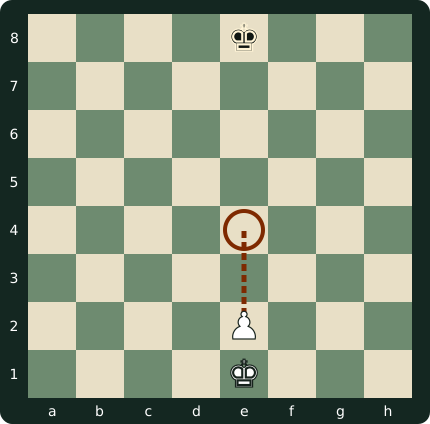
Rooks move along ranks and files, bishops move diagonally, and queens can do both. They travel through empty squares and may land on an opposing piece to capture it. Knights move two squares in one direction and one at a right angle, jumping over other pieces if needed. A king moves one square in any direction to a safe square. Pawns move straight ahead and capture diagonally forward. A pawn can move two squares from its starting square if both are empty. The diagram shows this option from e2 to e4.
Three special moves
To castle kingside as White, move the king from e1 to g1. The rook moves automatically from h1 to f1. Queenside, the king goes to c1 and the rook from a1 to d1. Neither piece may have moved, the squares between them must be clear, and the king cannot castle out of, through or into check. For en passant, suppose Black has just played d7–d5 beside your pawn on e5. On your next move only, you may move to d6 and capture that pawn. A pawn reaching the last rank automatically becomes a queen in this version.
Controls
On a phone, tap a white piece and then a marked square. With a mouse, click the same two squares. Use Tab or the arrow keys to move between squares, and Enter or Space to select a piece or destination. Escape toggles pause when the game has focus. The fullscreen button is above the board. A marker on an empty square shows a legal destination. A marker on an opposing piece shows a possible capture.
Tips for your first game
Try e2–e4 to take space in the centre and open a diagonal for the bishop on f1. The move g1–f3 develops the knight and puts pressure on central squares. Pay attention to the computer’s reply after each move. If a piece comes under attack, see whether you can defend it, move it away or capture the attacker. Before capturing, ask whether an opposing piece can take back on that square. Develop several pieces so they can support each other, and consider castling when the position allows.
Rating and progress
Your local rating starts at 800. A win earns rating points and gold according to the level. A loss by checkmate costs rating points, while stalemate adds a small amount of rating and gold. Changing difficulty begins a new game. You can stay on the same level and try a different opening or move up when you feel comfortable. Your rating, gold and board colours are saved in this browser.
Frequently asked questions
Can I play on my phone?
Yes. Tap a white piece and then a marked square.
Which special moves are supported?
Castling and en passant are supported. A pawn reaching the last rank automatically becomes a queen.
What is saved?
Your rating, gold and board colours are saved in this browser. Reloading ends the current game.
Can I undo a move?
This version has no undo option. You can start a new game.
Does the game detect every draw?
It detects stalemate. Threefold repetition, the fifty-move rule and insufficient material are not detected automatically.