

A quick look at the game
Tiny Traffic is a free browser puzzle about finding a way out. Tap a toy car and it travels in the direction of its roof arrow, provided the whole route is clear. Empty the board to finish. There are 100 levels, no time limit, helpful hints and an undo button. Later puzzles introduce tiny cars that occupy just one square.
Read the arrows before you move
The bright cars might suggest a driving game, but your main task is observation. Every vehicle has a fixed direction, shown by a solid triangle. You cannot steer around corners or slide a car sideways into a gap. Instead, look for a vehicle whose straight route reaches the edge without meeting another car.
A successful tap sends that car off the board. The space it leaves may open a route for the next vehicle, which can release another one in turn. Every car must leave before the level ends. There is no special target car that finishes the puzzle while the rest of the traffic remains behind.
Level 1 shows how a clear route works
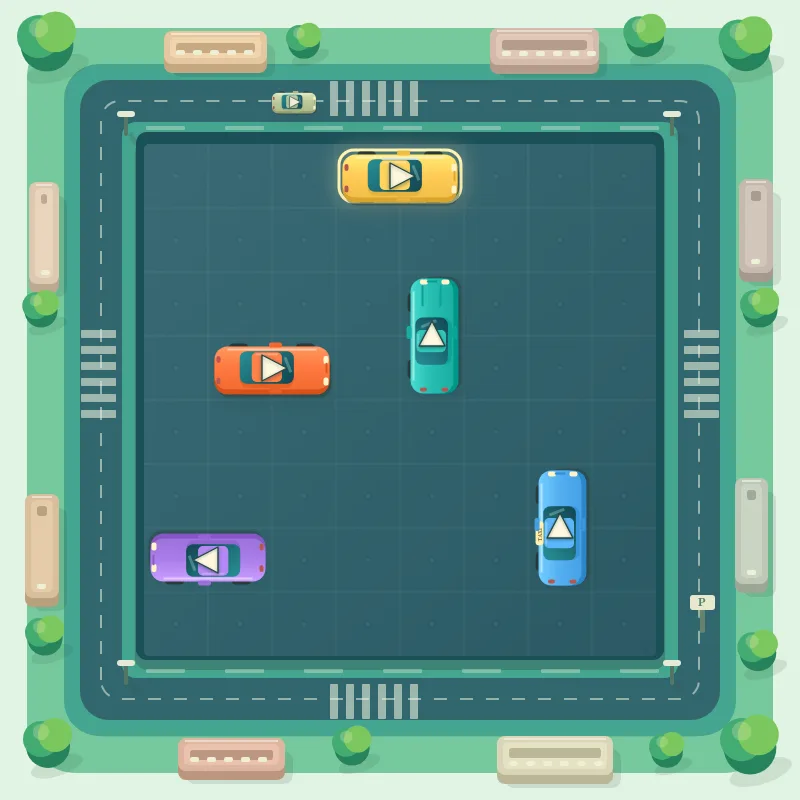
In the first picture, the hint highlights the yellow car near the top. It can travel right. Once it leaves, the turquoise car can head upwards; after that, the orange car can drive right. This is one useful starting sequence, rather than a rule that yellow cars always have priority.
Follow the arrow all the way to the boundary. An empty square immediately in front of the bonnet is not enough if another vehicle stands farther along the same line. On an open board, this check takes a moment. As the traffic thickens, it becomes the most useful habit you can develop.
A blocked car tells you what went wrong
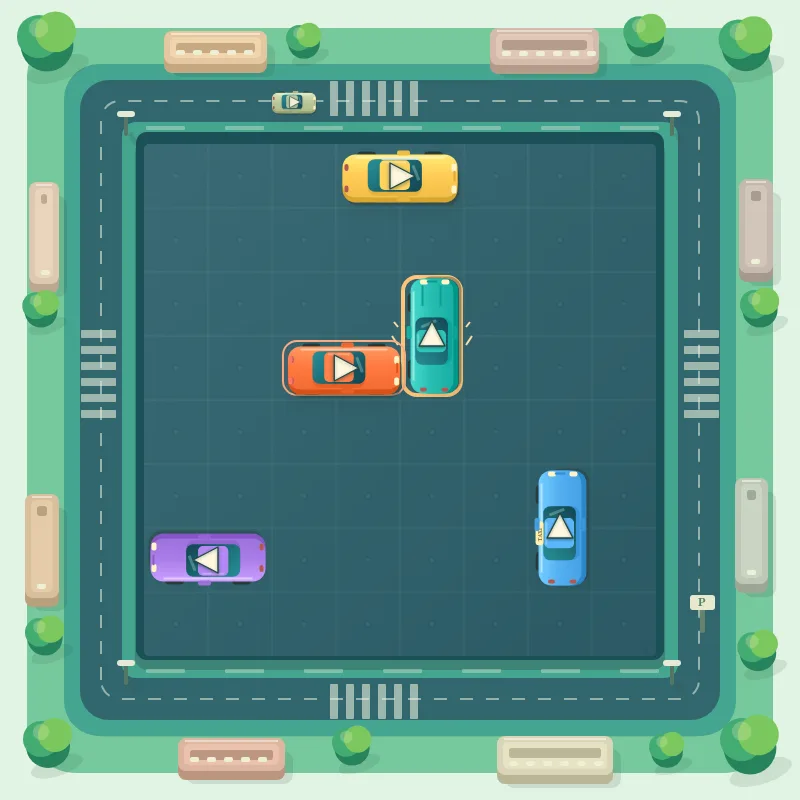
The second picture catches an unsuccessful departure. The orange car has been tapped while the turquoise vehicle still blocks its lane. It approaches the obstacle, brakes and rolls back. Brake lights, a brief warning around the blocking car and a muted contact sound make the obstruction easier to recognise.
That attempt counts as a mistake, but it does not remove either vehicle. You can carry on from the same arrangement. If you are aiming for three stars, take a second look before trying again: the useful question is which car must leave first, not whether there is enough room for a short shuffle.
How the 100 levels become more demanding
The journey has five difficulty stages of 20 levels: Relaxed, Tricky, Challenging, Expert and Master. The scenery also changes, from sunny streets and green suburbs to golden evening light, a neon city and the coast. These settings give the boards a different atmosphere without changing the basic movement rules.
From Level 41 onwards, just one car is free to leave at the beginning. Blocking chains become longer and the later boards hold up to 56 vehicles. You may need to follow several connected obstructions before spotting the starting point. Clearing a car then changes which routes deserve your attention next.
Why the one-square Minis matter
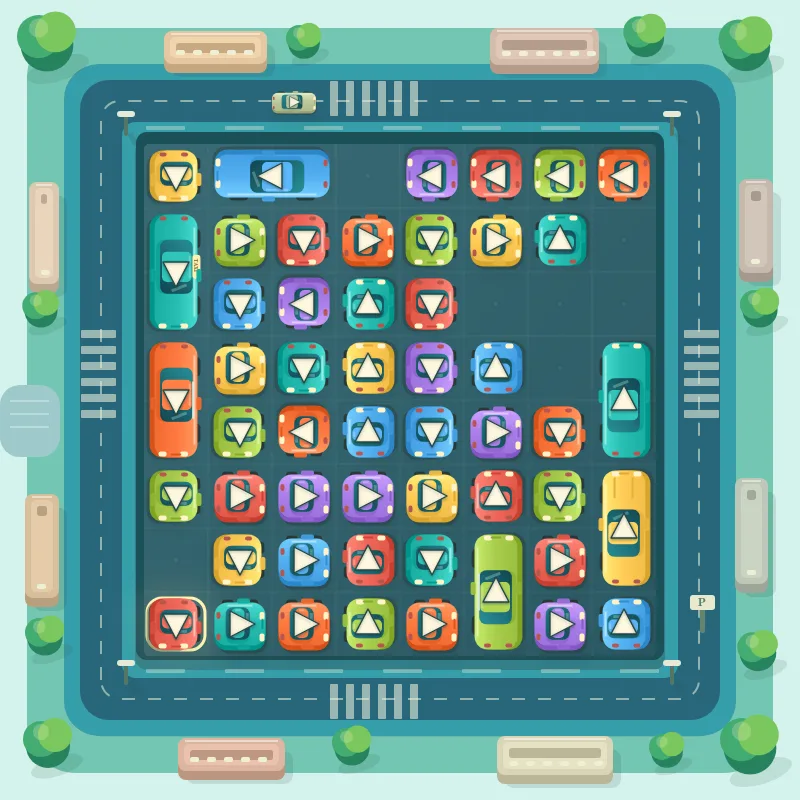
Minis arrive from Level 21. Each takes up one grid square, making it possible to pack more vehicles into the same space. A little car between two longer ones can be easy to overlook, yet it blocks a departure route just as effectively. Always check its arrow as carefully as any other.
The third picture shows Level 90: 51 vehicles, including 45 Minis. Only one car can leave initially, and the hint outlines it at the bottom left. The crowded arrangement rewards a methodical search. Vehicle colour and size do not grant priority; the clear route is what determines whether a move works.
Hints and undo can help you understand a board
Start with arrows pointing towards an outside edge. If a lane is blocked, inspect the obstructing car next and follow its own route. This gives your search a clear direction. After a successful departure, check the neighbouring rows again rather than assuming the next useful move must be somewhere else.
Hint highlights a vehicle that can genuinely leave in the current position. Undo brings back the most recently departed car, allowing you to study the arrangement again. It does not erase recorded hints or mistakes. Think of it as a way to revisit a move, rather than a way to rewrite the scoring record.
Stars reward accuracy rather than speed
Earn three stars with no mistakes and no hints. Two stars allow up to three mistakes and two hints. Finishing the board always earns at least one star. Your completion time and move count are shown after the level, but the star rating depends on mistakes and hints, not how quickly you tapped.
Use the level selection to revisit puzzles you have already cleared. Restart restores all cars in the current level, while stars already earned are kept. You can therefore work through an unfamiliar layout with help first, then return for a cleaner solution. There is no need to rush that second attempt either.
Play on a computer or mobile
The controls suit mouse and touchscreen play: click or tap the car you want to send away. On a keyboard, Tab and Enter reach vehicles and buttons. H requests a hint, while U undoes the last departure. The pause control lets you stop and look away without needing to finish the current board.
Frequently asked questions
Is Tiny Traffic free to play?
Yes. The game itself is free, and its 100 levels, hints and undo function do not require in-game purchases. It runs in a browser, so you do not need to install a separate game application before using the controls described here.
Can I drag cars or turn them around?
No. Tapping a vehicle sends it straight along its arrow if the entire lane is clear. You cannot drag it to an arbitrary square, change its direction or steer it past a blocker. Solving the arrangement means identifying which departures are currently possible.
Does a failed move end the level?
No. The blocked car returns to its original position and the attempt is counted as a mistake. Continue looking for a clear route, or request a hint. The mistake affects your possible star rating but does not prevent you from completing the puzzle.
Is there a timer I need to beat?
There is no countdown or time limit. The game records the time taken and shows it at completion. Taking longer to inspect a difficult lane does not reduce your stars. Accuracy and the number of hints used determine that rating.
Will a hint ever point to a blocked car?
The hint checks the current arrangement and selects a vehicle with a clear departure route. It offers a valid next step. Using it counts as a hint for that attempt, so a three-star finish will require restarting or replaying without hints.
Where is my progress saved?
Your level progress, stars, ongoing game and settings are saved locally in your browser. Clearing site data can remove them. Private browsing or restrictive storage settings may also limit saving, so keeping the same browser matters when you want to continue later.
Can I continue on another device?
There is no automatic progress synchronisation between devices. A game started in a desktop browser is not automatically available on your phone. Different browsers on the same device also use their own local storage. Returning to the original browser preserves access to its saved progress.
How do I leave fullscreen?
Try a different challenge
PONG tests your paddle timing. STARTRAIL calls for quick reactions, while PRISM BLOCKS lets you find the right places for your blocks.